How to Ask Customers for Google Reviews Without Being Pushy
To ask for a Google review without being pushy, wait until the customer has received the value, keep the invitation short, request honest feedback rather than five stars, provide one direct link, and make “no response” acceptable. A respectful request feels like an optional contribution, not a debt the customer owes the business.
Why review requests feel awkward
Owners and employees often avoid asking because they imagine an uncomfortable face-to-face demand: “Please give us five stars.” That version is awkward because it asks for a predetermined rating, puts the customer on the spot, and makes the interaction about the business’s need for praise. A better request is an invitation to share an honest experience at a convenient time.
The difference is operational as much as verbal. When the request is linked to a normal completion event, delivered through the customer’s usual channel, and easy to ignore, it feels routine. When the owner remembers weeks later and sends repeated emotional messages, it feels like pressure.
Audit the experience before asking
Check whether your profile, recent reviews, replies, and customer journey support a credible request.
Check your reputation score1. Ask after value has been delivered
The right timing communicates respect. Do not request a review while the issue is unresolved, before the product arrives, or while the customer is waiting for a promised action. Ask after a clear value moment: the repair works, the appointment ends, the project is approved, the order is delivered, or the customer thanks the team.
That does not mean staff should judge who is “happy enough” to receive a public review link. The completion trigger should apply consistently to eligible customers. If a complaint exists, resolve it because that is good service, not because you are trying to prevent a public review.
For each service, write one sentence: “The customer has received the value when ____.” That blank becomes the trigger. Test the timing with a small cohort, then adjust based on delivery, click, opt-out, and completion data.
2. Ask for honesty, not a five-star result
Language determines whether the request feels manipulative. “Leave us a five-star review” tells the customer what conclusion to reach. “Share your honest experience” protects customer choice. It also produces more credible feedback and aligns with the purpose of public reviews.
A tactful request has four parts: a personal thank-you, a reference to the completed experience, a neutral explanation of why feedback is useful, and one direct link. It does not need a speech about survival, ranking, employee bonuses, or how much the owner needs help.
Thank you + relevant context + optional honest invitation + direct link.
Example: Hi Maya, thank you for choosing Northside Plumbing today. If you have a moment, you’re welcome to share your honest experience. It helps future customers make an informed choice: [link]
3. Make the invitation easy to decline
Pressure often comes from implied obligation. Phrases such as “we really need this,” “please do it today,” or “our technician depends on your five-star review” transfer the business’s problem to the customer. A confident request is brief and does not escalate if the customer remains silent.
You do not need to add a dramatic disclaimer. Simple optional language works: “if you have a moment,” “you’re welcome to,” or “if you’d like to share your experience.” The message should be easy to understand and easy to ignore. Respect is shown by behavior: limited reminders, immediate opt-out handling, and no follow-up questioning about why the customer did not post.
4. Use the channel that fits the relationship
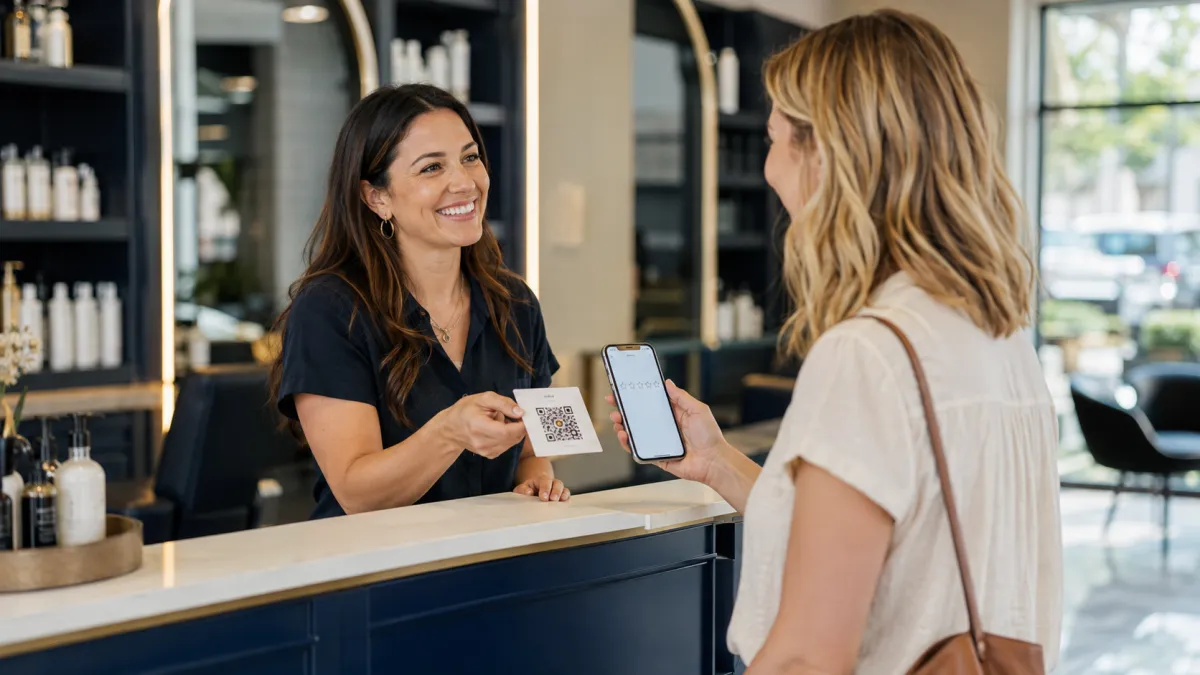
SMS is effective for businesses that already use text for appointment or service communication. Email gives more room for context and works well for professional services or online purchases. WhatsApp may be appropriate where it is an established customer channel and consent requirements are met. In-person requests can feel natural when staff mention that a link will arrive later. QR codes work at physical locations, receipts, packaging, and checkout displays.
Do not stack every channel at once. A customer who receives an SMS, email, WhatsApp message, and phone request may feel chased. Define a primary channel and a fallback only when appropriate. Keep records so automations do not overlap.
| Channel | Best use | Pushiness risk |
|---|---|---|
| SMS | Short, timely post-service request | Too many reminders or late-night sends |
| Professional or detailed relationships | Long emotional copy | |
| Existing conversational channel | Unsolicited outreach | |
| QR code | Checkout, receipt, table, front desk | Staff watching the customer complete it |
| In person | Set expectation for later message | Requesting a specific rating |
5. Give staff words they can actually say
Vague training creates awkward improvisation. Give the team one approved sentence for each moment. The script should sound natural in the business’s voice and never specify a star rating. Train staff to say it once, then move on.
“You’ll receive a short message with a link if you’d like to share honest feedback about today’s service.”
“Thanks for coming in today. We’ll send a quick feedback link, and you’re welcome to share your experience if you have a moment.”
“I’m glad we completed this stage. If you’re comfortable sharing your experience, I’ll send a direct Google review link.”
“There’s a QR code on the receipt if you’d like to leave honest feedback about your visit.”
Employees should not hold the customer’s phone, watch the review being written, offer wording, or celebrate only high ratings. The customer controls the content.
6. Write short messages that sound human
Personalization does not require surveillance or a long paragraph. Use the first name where appropriate, business name, and a broad reference to the service. Avoid sensitive details in SMS. The best copy respects the customer’s time and makes the next step obvious.
SMS templates
Hi [Name], thanks for choosing [Business]. If you have a moment, we welcome your honest feedback about your experience: [link]
Hi [Name], we appreciate the opportunity to help with [general service]. You’re welcome to share an honest Google review here: [link]
Email template
Subject: How was your experience with [Business]?
Hi [Name], thank you for trusting us with [service]. Your honest feedback helps our team improve and helps future customers understand what to expect. If you’d like to share your experience, here is the direct link: [link]
Thank you,
[Team or owner name]
Reminder template
Hi [Name], just a brief follow-up in case the earlier link arrived at a busy time. If you’d like to share honest feedback, you can do so here: [link]. No action is required.
The compliance line every business must understand
Legitimate review growth is not about manufacturing praise. It is about giving real customers a simple, equal opportunity to describe a genuine experience. Google explicitly allows businesses to remind customers to leave reviews and to share a review link or QR code. Google also says businesses should value honest and balanced feedback. The safest operating rule is therefore simple: ask consistently, welcome honest feedback, and never make the invitation conditional on how satisfied someone appears to be.
Do not buy reviews, write reviews for customers, ask employees or people without a genuine experience to post, or offer discounts, gifts, contest entries, loyalty points, or free services in exchange for a review. Do not send only happy customers to Google while diverting unhappy customers elsewhere. That practice is commonly called review gating. A private feedback form can be useful for service recovery, but it must not be used to decide who is allowed or invited to leave a public review.
7. Use reminders without creating pressure
A reminder should assume the customer was busy, not that they owe the business a response. Send it after enough time has passed, keep it shorter than the original request, and stop after a defined limit. Many businesses can begin with one reminder after two or three days. A second and final reminder may fit some long-term or high-engagement relationships, but it should not be automatic by default.
Suppress messages when a review is completed, the customer opts out, the number is invalid, a complaint requires human attention, or the customer asks not to be contacted. Respect quiet hours and applicable consent rules. The reputation system should not harm the relationship it is meant to reflect.
Use tested request and reminder workflows
Download the ReviewNix playbook for practical profile, message, QR, and follow-up guidance.
Get the free playbook8. Avoid the phrases that make customers uncomfortable
| Avoid | Why it feels pushy | Use instead |
|---|---|---|
| “Please give us five stars.” | Predetermines the customer’s opinion. | “We welcome your honest feedback.” |
| “We need reviews to survive.” | Creates guilt and obligation. | “Feedback helps others know what to expect.” |
| “Do it now while I wait.” | Removes privacy and choice. | Send a link for later. |
| “Get 10% off for reviewing us.” | Incentivizes a review and conflicts with policy. | No reward; make the process easy. |
| “If you loved us, review us on Google.” | Selects customers based on sentiment. | Invite all eligible customers neutrally. |
| “Why haven’t you reviewed us?” | Challenges the customer’s decision. | Use one optional reminder, then stop. |
9. Automate consistency while preserving judgment
Automation is useful when it removes administrative forgetfulness. A safe workflow starts with a genuine completed-service event, verifies the correct location and customer contact, schedules a neutral message, records delivery, sends a limited reminder, and stops when the customer completes or opts out.
Human judgment remains necessary for sensitive services, unresolved disputes, privacy concerns, and unusual circumstances. The solution is not to gate the public review invitation. It is to pause inappropriate automated communication while the service issue is actively handled according to a documented rule that is not based on seeking only positive ratings.
ReviewNix supports SMS, email, WhatsApp, direct review links, QR codes, reminders, dashboards, and AI-assisted response drafts. The guided onboarding session maps the customer journey and configures the trigger, timing, templates, and stop conditions.
10. Test tactfulness with data and customer feedback
Track request coverage, delivery, clicks, reviews, opt-outs, complaints about messaging, and median response time. A rising opt-out rate or negative replies to requests may indicate poor timing, excessive frequency, or copy that feels demanding. Do not optimize only for review conversion; protect customer trust.
Run controlled tests. Compare two neutral subject lines, or a same-day request with a next-day request. Change one variable at a time and keep the compliance standard identical. Ask frontline staff what customers say about the process. The best workflow is both effective and comfortable.
- Was the service genuinely completed?
- Is this the correct customer and location?
- Does the message ask for honest feedback?
- Is the direct link tested?
- Is the timing appropriate?
- Are reminders limited and suppressions active?
- Would the message still be acceptable if the customer had a mixed experience?
A seven-day implementation plan
- Day 1: define the completed-value moment.
- Day 2: generate and test the direct Google review link.
- Day 3: approve one neutral SMS and one email template.
- Day 4: train staff on one spoken sentence.
- Day 5: configure one primary channel and suppression rules.
- Day 6: add one respectful reminder and test the QR code.
- Day 7: launch, monitor delivery, and review customer reactions.
Configure the workflow correctly from day one
Use guided onboarding to connect your profile, triggers, templates, channels, reminders, QR code, and reporting.
Start your 14-day software trialPrefer not to chase customers? ReviewNix runs the review workflow on autopilot
You can build and manage this process manually, but that still leaves the owner or team responsible for remembering every request, sending the right link, following up, stopping reminders, monitoring new reviews, and replying on time. ReviewNix removes that repetitive work by turning the process into one consistent workflow.
During guided onboarding, we connect your Google Business Profile, define the completed-service trigger, prepare your SMS, email, or WhatsApp templates, set the timing and reminder limits, create the direct review link and QR code, and confirm the correct stop rules.
- A service is completed: the customer reaches the trigger configured for your business.
- ReviewNix sends the request: the customer receives a short, neutral invitation with the correct direct review link.
- Follow-up happens automatically: respectful reminders are sent according to the agreed schedule, without the owner chasing anyone manually.
- The workflow knows when to stop: completed actions, opt-outs, and configured exceptions prevent unnecessary messages.
- Your reputation stays active: the dashboard centralizes activity, and AI-assisted reply drafts help you respond faster in your own professional tone.
The customer always decides whether and what to write. ReviewNix does not create fake reviews, offer incentives, or selectively invite only happy customers. It automates a legitimate, consistent request process so excellent service has a better chance of becoming visible online.
Set it up once. Let ReviewNix handle the follow-up.
Stop relying on memory and manual chasing. Configure your review workflow during guided onboarding, then let it run automatically after every completed service.
Start your 14-day software trialFrequently asked questions
Is it pushy to ask for a Google review?
No, if the request is timely, optional, brief, neutral, and easy to ignore. It becomes pushy when it demands a rating, creates guilt, uses repeated reminders, or puts the customer on the spot.
What is the best sentence to use?
“If you have a moment, we welcome your honest feedback about your experience.” Add a thank-you and direct link. Keep the language consistent with the business’s normal voice.
Can I ask in person?
Yes. Mention that a link or QR code is available, then give the customer privacy. Do not watch them write, take their phone, or suggest a star rating.
When should I send a reminder?
A practical starting point is one polite reminder after two or three days. Measure customer response, stop after a defined limit, and respect all opt-outs.
Can I ask only customers who complimented the service?
No. That can become selective solicitation or review gating. Create a neutral, consistent invitation for all eligible customers and handle service problems because resolving them is the right operational response.
Practical editorial note
A reputation program should be judged by the quality of the customer experience as well as the number of published reviews. Before scaling outreach, confirm that contact consent, customer records, location routing, service-completion statuses, and opt-out handling are reliable. A larger automation magnifies both good and bad process design. Begin with a controlled launch, review message delivery and customer reactions, then expand only after the workflow behaves as intended.
Keep the operating language neutral across every touchpoint. The goal is to increase the percentage of genuine customers who receive a fair opportunity to comment, not to engineer a particular rating. When teams understand that distinction, staff scripts become more comfortable, customers retain control, and the resulting profile becomes a more credible representation of the business. Review policies and messaging regulations can change, so recheck current platform guidance and applicable communication rules before major campaign changes.
